Your questions, answered.
What is the Library of Things?
The Library of Things allows University of Aberdeen students and staff to borrow useful items through the AUSA website. You can browse the catalogue, reserve what you need, collect it from the AUSA office and return it when you are finished.
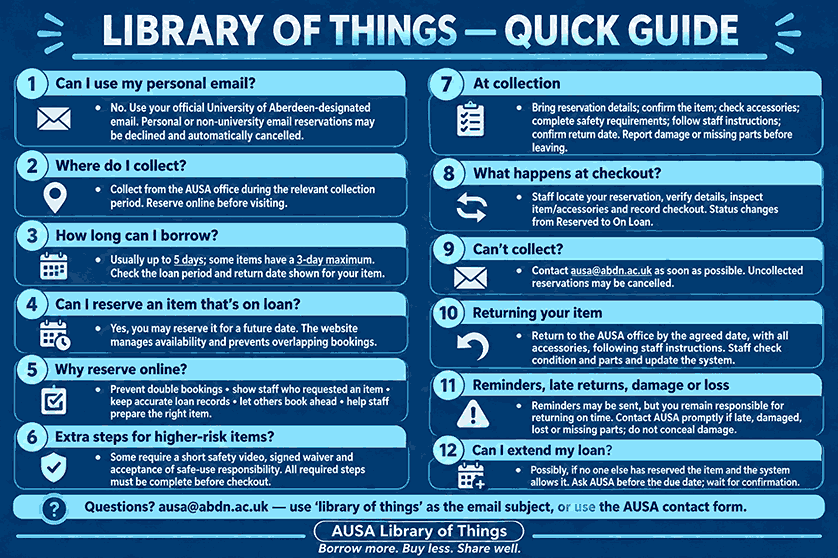
Quick guide
Who can use the Library of Things?
University of Aberdeen students and staff can use the Library of Things, provided they make their reservation using their official University of Aberdeen email address.
How do I reserve an item?
- Visit the Library of Things website
- Register or sign in using your University of Aberdeen-issued email address.
- Browse the catalogue.
- Select the item you would like to borrow.
- Choose an available reservation period.
- Submit your reservation.
- Wait for confirmation before collecting the item.
Please make your reservation through the website before visiting the AUSA office.
How long can I borrow an item?
The usual maximum loan period is five days. Some items have a shorter maximum loan period of three days.
The permitted loan period will be shown when you make your reservation. Please check the return date carefully.
Do any additional steps apply to higher-risk items?
Yes. Some higher-risk items require additional checkout steps before they can be borrowed.
You may be required to:
- Watch a short instructional safety video.
- Complete a waiver confirming that you understand the safety guidance.
- Accept responsibility for using the item safely.
The item cannot be checked out until all required steps have been completed.
What should I do when collecting my item?
When collecting your item:
- Bring any information needed to confirm your reservation.
- Confirm that the item is the one you reserved.
- Check that the item and its accessories are present.
- Complete any required waiver or safety-video requirements.
- Follow the instructions provided by staff.
- Confirm the return date.
Please raise any concerns about damage or missing parts before leaving with the item.
What happens when I collect an item?
A member of staff will use the staff loan and reservation dashboard to:
- Locate your reservation.
- Confirm your details and the item requested.
- Check the item and any accessories.
- Record the relevant checkout information.
- Mark the item as Checked Out.
Once the item is checked out, its status changes from Reserved to On Loan. This ensures that the item cannot be booked by someone else during your loan period.
What happens if I return an item late?
Late returns may prevent other students or staff from using the item and may affect your ability to borrow items in the future.
If you think you will be unable to return an item on time, contact the AUSA office (ausa@abdn.ac.uk) as soon as possible.
What happens if an item is damaged or lost?
Please report damage, loss or missing parts to staff as soon as possible.
Do not attempt to conceal damage or return an incomplete item without informing staff. The matter will be considered in accordance with the relevant AUSA policy.
Can I extend my loan?
An extension may be possible if the item has not been reserved by another user and the system permits an extension.
Please contact the AUSA office (ausa@abdn.ac.uk) before the original return date. Do not assume that an extension has been granted unless it has been confirmed.
Who should I contact if I have a question?
If you have a question about the Library of Things, please contact ausa@abdn.ac.uk (please use 'library of things' as a reference for the subject of the email). Alternatively, you can fill out our contact form here